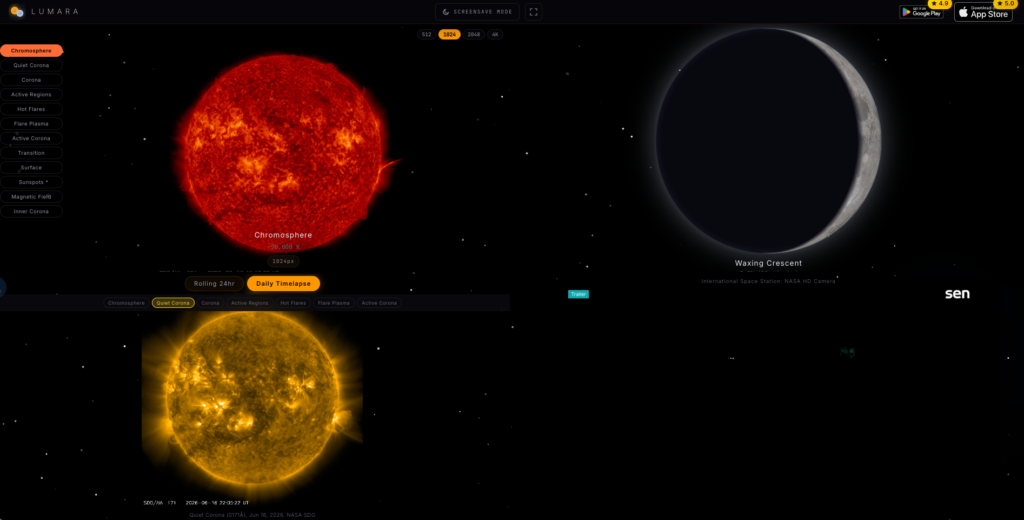
Lumara is presented as a free astronomy and space dashboard focused on the Sun, the Moon, and near-Earth space weather. Based on the available site evidence, its core pitch is simple: give users live NASA Solar Dynamics Observatory imagery, moon phase information, ISS Earth feed access, and space weather alerts without accounts, ads, tracking, or a paid tier.
That is a useful niche. Most casual astronomy apps lean heavily toward stargazing maps, constellation identification, or planetarium-style views. Lumara appears narrower and more observational: it is less about identifying stars overhead and more about checking what the Sun is doing, what the Moon looks like, and whether solar flares, coronal mass ejections, or geomagnetic storms are active.
What Lumara Is
Lumara describes itself as a “Live Sun & Moon Dashboard” and a “Sun & Moon Live Viewer.” The site metadata says it is available on Android and iOS, with Android 8.0+ and iOS 14.0+ listed in its structured data. The app is categorized as entertainment, with an astronomy and space subcategory.
The evidence points to a mobile-first product rather than a general web research tool. The website itself functions mainly as a product page and discoverability surface, with app store links listed in the structured data. The claimed software version in the provided evidence is 1.1.1.
The strongest claim is that Lumara is free. Its structured data lists a USD price of 0, says it is accessible for free, and describes “no premium tier.” The site copy also claims no signup, no ads, and no tracking. Those privacy and pricing claims are attractive, but they should still be treated as site claims unless independently confirmed through app store listings, network inspection, or hands-on testing.
What Problem It Solves
Lumara seems built for people who want quick access to space-related conditions without hopping between several official or scientific websites. Instead of checking one source for solar imagery, another for moonrise and moonset, another for space weather, and another for an ISS feed, Lumara packages these into a single dashboard.
That matters because solar and lunar data can be scattered. NASA imagery, space weather event data, and local moon timing are not hard to find, but they are not always presented in a casual, mobile-friendly way. Lumara’s value is in packaging and presentation: a quick visual dashboard for people who are curious about the Sun and Moon but do not want to work through agency portals or raw data feeds.
Key Features and Use Cases
The headline feature is live NASA SDO solar imagery. The site claims 12 NASA SDO wavelengths, with resolution up to 4096x4096. If implemented well, this could be genuinely useful for solar observers, educators, and anyone who enjoys seeing the Sun beyond visible light. Different wavelengths reveal different solar features, so having a multi-wavelength viewer is more meaningful than showing a single solar image.
Lumara also claims daily and rolling 24-hour solar timelapse videos. This is a smart feature because solar activity is often easier to understand in motion than in a static image. A timelapse can make flares, active regions, and changes across the solar disk easier to notice.
For Moon tracking, Lumara claims real-time moon phases with photorealistic imagery, moonrise and moonset times for 200+ cities worldwide, a far side of the Moon toggle, and fully offline moon calculations. The offline calculation claim is important: if true, it means some lunar functions should remain usable without a network connection. The site also says location is stored on-device only.
Space weather is another major part of the pitch. Lumara says it uses NASA DONKI for live space weather and tracks solar flares, CMEs, and geomagnetic storms. That makes the app potentially useful for people watching aurora conditions, solar activity, or general space weather events. However, the evidence does not show how detailed the alerts are, how often the data refreshes, whether it explains event severity clearly, or whether users can configure notifications.
The site also references an ISS Earth feed. The available evidence does not provide much detail beyond mentioning the feature, so it is hard to judge whether this is an embedded live feed, a curated viewer, or simply access to existing public footage.
Who Lumara Is For
Lumara is likely best for casual astronomy fans, space enthusiasts, educators, students, photographers planning around moon conditions, and people who enjoy checking live space data. It could also appeal to aurora watchers who want a lightweight way to monitor solar flares, CMEs, and geomagnetic storm references.
It is probably not a replacement for professional space weather platforms, observatory software, or advanced astronomy planning tools. The evidence does not mention telescope control, star charts, ephemeris exports, advanced notification rules, raw data downloads, or scientific analysis tools. Based on the source material, Lumara should be viewed as a clean consumer dashboard, not a research-grade instrument.
Strengths
Lumara’s biggest strength is focus. The product does not try to be every astronomy app at once. The combination of Sun imagery, Moon phase data, ISS viewing, and space weather gives it a clear identity.
The privacy positioning is also strong if accurate. “No accounts, no tracking, no ads” is exactly the kind of friction-free model many users want from a utility app. The claim that location is stored on-device only is especially relevant for a moonrise and moonset app, because location-based tools often raise privacy questions.
The use of NASA-linked sources is another plus. The site specifically names NASA SDO for solar imagery and NASA DONKI for space weather. That does not automatically prove implementation quality, but it suggests Lumara is not merely showing generic space graphics. It is at least positioning itself around credible public data sources.
The free pricing model lowers the risk of trying it. The structured data even lists an aggregate rating of 4.94 from 16 ratings or reviews. That is a positive signal, but the sample size is small and comes from the product’s own page evidence, so it should not be over-weighted.
Limitations and Risks
The main limitation in this review is the thinness of verifiable evidence. The provided source is mostly metadata, structured data, and site text rather than hands-on testing. That means important questions remain unanswered: how fast the app loads, whether imagery updates reliably, how polished the interface feels, how accurate city-based moon times are, and whether the privacy claims hold up in real use.
There is also no supported detail about app store review distribution, developer history, support policy, changelog depth, or data refresh intervals. The author or organization is listed as Beeswax Pat, with a GitHub rel-me link in the page source, but the evidence does not establish much beyond that identity signal.
Another risk is expectation mismatch. Terms like “live” and “real-time” can mean different things depending on data source latency. Solar imagery and space weather feeds often have update delays, and the evidence does not define the timing. Users expecting second-by-second monitoring may need to verify how fresh the data actually is.
Practical Verdict
Lumara looks like a focused, appealing app for people who want a simple Sun, Moon, and space weather dashboard on mobile. Its best-supported strengths are the feature mix, the NASA SDO and NASA DONKI positioning, the free price, and the privacy-forward claims.
The practical verdict: Lumara is worth trying if you want an easy way to check solar imagery, moon phases, moonrise and moonset, and space weather from one app. Just treat the stronger claims, especially “real-time,” “no tracking,” and rating data, as claims to verify through hands-on use and app store details. The idea is strong; the available evidence is promising but not enough for a full performance or privacy audit.
FAQ
Is Lumara free?
According to the provided site evidence, Lumara is free, has no premium tier, and lists a USD price of 0.
Does Lumara require an account?
The site claims no signup is required. This review has not independently verified the app onboarding flow.
What data sources does Lumara mention?
The source evidence mentions NASA SDO for solar imagery and NASA DONKI for space weather. It also references an ISS Earth feed.
Is Lumara available on mobile?
Yes. The structured data lists Android and iOS download URLs, with Android 8.0+ and iOS 14.0+ operating system requirements.
Can Lumara replace professional astronomy or space weather tools?
Based on the evidence, no. It appears better suited as a consumer dashboard than a professional analysis platform.