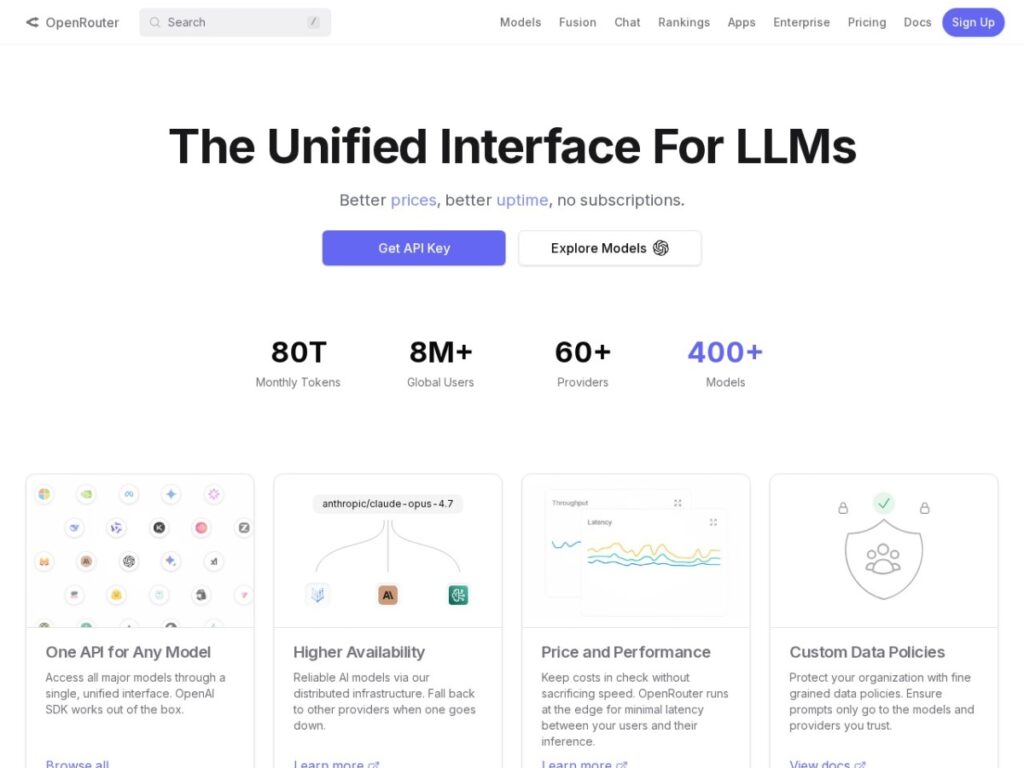
OpenRouter is not just another generic AI website. It is a unified API and model marketplace for developers who want access to many large language models through one interface. Instead of opening separate accounts with every model provider, learning every provider’s API differences, and wiring up your own fallback logic, OpenRouter lets you send requests to a single endpoint and choose from a broad catalog of models.
The short version: OpenRouter is most useful when you are building AI products, internal tools, agents, or experiments where model choice matters. If you regularly compare GPT, Claude, Gemini, Llama, Mistral, DeepSeek, Qwen, or other models, OpenRouter can save real integration time. If you only use one model from one provider, the value is smaller.
What is OpenRouter?
OpenRouter provides a unified API for accessing hundreds of AI models from different providers. Its own documentation describes it as a single endpoint for major LLMs, with automatic fallbacks and cost-effective routing options. For developers, the important part is that the API is designed to feel familiar: the chat completions format is very close to the OpenAI-style API, and existing OpenAI-compatible SDKs can usually be pointed at https://openrouter.ai/api/v1 with minimal changes.
That makes OpenRouter less of a consumer chatbot and more of infrastructure. It sits between your application and model providers, normalizes request and response formats, tracks usage, and handles parts of provider selection that would otherwise become custom engineering work.
Key features
- Unified model access: OpenRouter lets you browse and call 300+ models and providers from one place. The models API exposes metadata such as model IDs, descriptions, context length, supported parameters, architecture, and pricing.
- OpenAI-compatible integration: Developers can use standard chat completion patterns, OpenAI-compatible SDKs, direct HTTP requests, or OpenRouter’s own SDKs. This lowers migration friction for teams that already have AI code in production.
- Provider routing and fallbacks: OpenRouter can route requests across providers, prioritize price, throughput, or latency, and fall back when a provider fails. This is one of its strongest practical features for production apps.
- Transparent model pricing: Pricing is shown per model and provider, typically per million input and output tokens. OpenRouter says it passes through underlying provider inference prices, while charging fees around credit purchases or certain BYOK usage.
- Usage tracking and billing: Instead of managing invoices and dashboards across multiple AI providers, users can deposit credits, track activity, and view usage in one account.
- Advanced capabilities: Depending on the model, OpenRouter supports tool calling, structured outputs, streaming, images, PDFs, reasoning options, and plugins such as web search or response healing.
Who should use OpenRouter?
OpenRouter is best for developers, AI builders, technical founders, and teams that actively compare models or need flexibility. It is especially useful if your product may need to switch models over time, route different tasks to different models, or maintain uptime when a provider is temporarily unreliable.
It is less compelling for casual users who only want a chat interface, or for companies that have already standardized deeply on one provider with direct enterprise terms and custom security requirements.
Strengths
The biggest strength is optionality. The AI model market changes quickly. A model that is best this month may be average next quarter. OpenRouter gives builders a way to keep their application architecture stable while changing the model behind it. That is valuable because model churn is now part of normal AI product development.
The second strength is resilience. Provider outages, rate limits, and occasional model errors are real production problems. OpenRouter’s fallback and routing tools can reduce the amount of custom failover code a team needs to build. You can also sort providers by price, throughput, or latency, or use shortcuts such as variants that prioritize speed or cost.
The third strength is visibility. Because OpenRouter exposes model metadata, pricing, supported parameters, and usage activity, it becomes easier to compare models in a practical way. You can evaluate not only benchmark reputation, but also context window, tool support, output modality, latency, throughput, and actual cost.
Limitations
OpenRouter also adds another dependency between your app and the underlying model provider. That dependency can be worth it, but it should not be ignored. If your product is extremely sensitive to vendor risk, compliance, procurement, or region-specific data handling, you will need to review OpenRouter’s privacy settings, provider logging behavior, and enterprise options carefully.
Pricing can also be more complex than it first appears. Each model has its own input and output token prices, and some models may charge for images, requests, cached tokens, web search, or reasoning tokens. OpenRouter’s unified billing helps, but developers still need to monitor usage and set model choices intentionally.
Finally, compatibility does not mean every model behaves the same. Quality, tool-calling reliability, context limits, and latency still vary, so production teams need testing, logging, retries, and evaluation.
OpenRouter vs direct provider APIs
Using a provider directly can be simpler if you only need one model family. Direct APIs may also offer the clearest support path, enterprise contracts, or provider-specific features. OpenRouter makes more sense when you want model diversity, routing flexibility, consolidated billing, or a faster way to test alternatives.
In practice, the choice is not always either-or. Some teams may use direct APIs for their most critical model path and OpenRouter for experimentation, overflow, fallback, or long-tail model access. Others may build entirely on OpenRouter because the convenience outweighs the extra abstraction layer.
Final verdict
OpenRouter is a strong developer tool for the current AI era because it solves a real infrastructure problem: too many models, too many providers, too much API fragmentation, and too much operational uncertainty. Its value is not that it makes one model better. Its value is that it makes model choice easier to manage.
If you are building with LLMs and expect to compare models, optimize cost, improve uptime, or move quickly as the market changes, OpenRouter is absolutely worth testing. If your needs are simple and tied to a single provider, it may be more abstraction than you need. For AI builders, though, it is one of the more practical pieces of model infrastructure available today.
FAQ
Is OpenRouter free?
OpenRouter uses a credit-based billing system. Some models may have free variants with rate limits, but paid model usage is charged according to the selected model and provider.
Is OpenRouter OpenAI compatible?
Yes. OpenRouter’s chat completions API is designed to be similar to the OpenAI Chat API, and many OpenAI-compatible SDKs can use OpenRouter by changing the base URL and API key.
Does OpenRouter host the models?
OpenRouter generally acts as a routing and API layer between your application and model providers. Requests are sent to the selected provider or routed according to your settings.
Who is OpenRouter best for?
It is best for developers and teams that need access to multiple AI models, want provider fallback, or need to compare cost, latency, throughput, and capabilities across models.